It sometimes happens that artifacts are visible in V2D encoder sources on CMS-decoders.
In most cases this is either related to network issues or to the decoder settings.
To check for network issues, create a pcap-file of the (multicast) stream of the encoder, and in Wireshark check whether there is significant packet-loss.
In case of packet loss, check the network for bandwidth issues, and for correct multicast settings (mainly IGMP snooping).
If the network is ok, then the artifacts might be caused by the decoder. This can normally be fixed by adding a latency to the decoding.
Barco-Encoder sources are normally configured in CMS by using a template like here: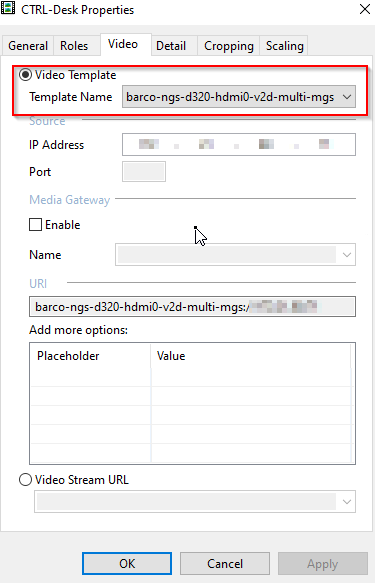
The templates need to be adapted.
This article describes how to adapt the used templates for adding latency.
The proces consists of 3 steps, and needs to be repeated for each template that is used:
- Download the template
- Modify the template
- Upload the template
1. Download the template
- Log in to the CMS-server Web-page, and select "Video Templates" on the left side:
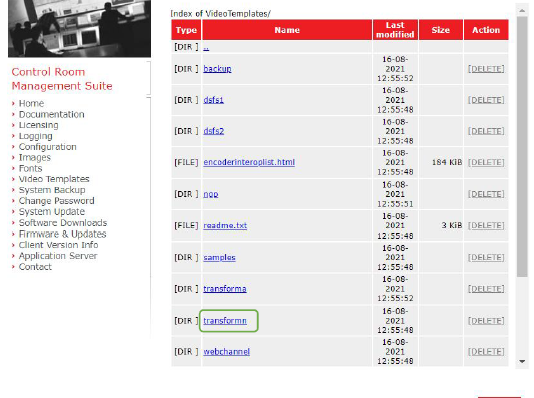
- Select the folder (DIR) "transformn"
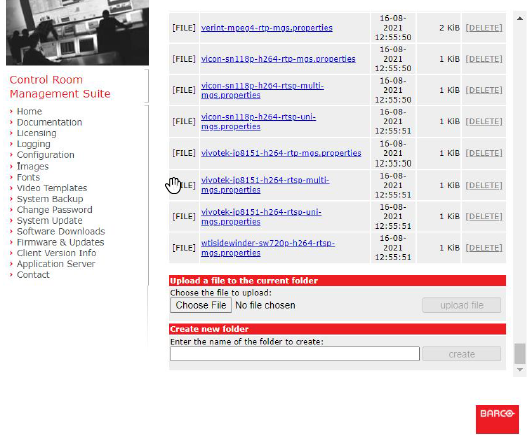
- Locate the template you want to modify and click on it
- Open the file in a text-editor (e. g. notepad), and scroll to the end of the file. It should look like this:
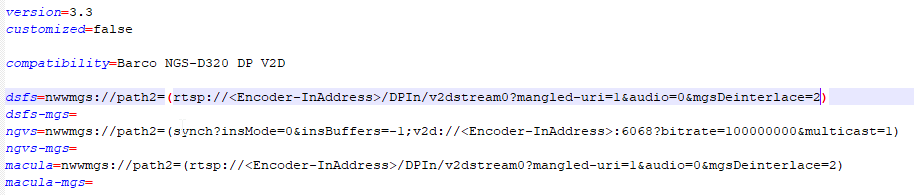
- Modify the file like shown below:
 - set the value of "customized" to "true" and add "&latency=200" to the urls as shown.
 - Save the modified template and upload it via the web-page
If the system is a redundant server system (AFO-system) reboot the current master, and repeat the whole procedure on the slave, so that also the templates on the slave are updated.
IMPORTANT NOTE: The above described method is mainly relevant for NDN devices. However, it will only work from NDNS v1.8 onwards. NDNS 1.8 is part of TFN 3.17