
1. LCD Panel - Pixel structure explained
2. Types of pixel and subpixel defects
3. Barco Pixel policy
4. Guidance for troubleshooting/diagnostic execution
1. LCD Panel - Pixel structure explained.
An LCD display has individual pixels arranged in a rectangular grid.
Each pixel comprises some black-masked space and three RGB-subpixels; each subpixel emits a red or green or blue color at a selected intensity.
When all three subpixels are turned off, it appears black. When all the subpixels are turned on 100%, it appears white.
By adjusting the individual levels of the red, green, and blue subpixels, millions of color combinations are possible for each pixel.
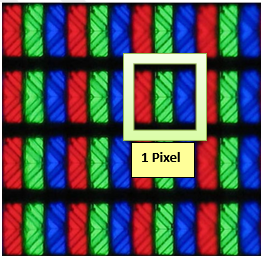
2. Types of pixel and subpixel defects
As a normal tolerance in the manufacturing process of the LCD, a limited number of subpixels may remain either dark or permanently lit, without affecting the diagnostic performance of the final product.
2.1 Dark Pixel defect
A dark pixel defect, also called "dark dot defect' or “dead pixel” is where the red, green, and blue subpixels or a certain part of them, are all permanently off.
A full-pixel defect would be where the red, green, and blue subpixels are all permanently off while we are typically discussing subpixel defects where only a certain part is defective (e.g. red, green, or blue off)
Since dark subpixel defects are permanently off, always displaying a black dot on the display, this kind of defective pixel is mostly visible on brighter (white) images.
Example 1 Subpixel defect: in this case the red subpixel is defective.
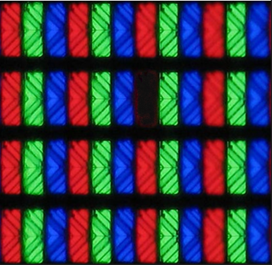
Example 2 Subpixel defect: in this case the red subpixel is partially defective.
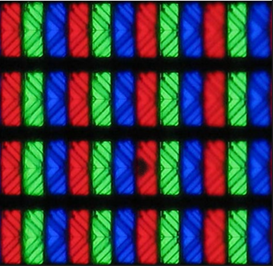
Example 3 full pixel defect: in this case the 3 subpixels are permanently off.
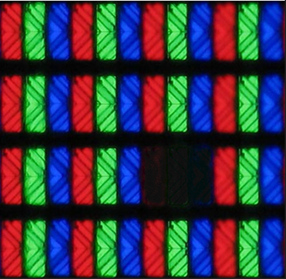
2.2 Bright Pixel defect
A bright pixel, also called "white dot defect" or "Hot pixel", is where the red, green, and blue subpixels are all permanently on. These kinds of pixels are always white/bright and most visible on darker(black) images.
There are also bright subpixel defects when only a subpixel or a certain part of the subpixel is permanently displaying a red, green, or blue dot on the screen.
In general, a bright subpixel is a subpixel with a defect in its ability to display the correct color output. It may look like a tiny spot on the screen that is brighter than black, although it may not be fully lit.
Another cause of a bright defect may be the presence of impurities in the liquid crystal. On the one hand, impurities will affect the alignment of liquid crystal molecules, and on the other hand, they can reflect light to form bright spots on the image.
3. Barco pixel policy
SUMMARY on what to do if you encounter pixel imperfections.
To ensure the optimal product quality, every Barco display is carefully inspected and validated prior to shipment to ensure it meets pixel specifications for that product model.
Pixel specifications differ by product model, based on LCD panel size, manufacturer, and intended use; inspection criteria i.e. viewing conditions for pixel/subpixels also vary.
Although one will discover that there are imperfections on the panel, it is not that these can all be categorized as a defect. Some of these imperfections are acceptable while others are not allowed.
In some cases, the imperfections are not related to panel pixel defects but are categorized as artefacts such as dust particles or blemishes for which also specific criteria are applicable.
The Barco Diagnostic Imaging displays can only be fully evaluated by trained personnel who are following applicable Barco guidelines and criteria and are using the correct tools.
The Barco pixel/optical-artefact criteria are applicable to define if the pixel brightness or optical artefact is covered by warranty.
Where there is a question regarding imperfections, i.e. pixel brightness or optical artefacts (blemish, dust particle), an RMA can be opened with the Barco Service Desk and the product returned to Barco for review and evaluation**.
- Display is within warranty: An advanced investigation can be proposed. Therefore, the display can be collected and returned to the Barco Repair Center via the RMA-process.
Depending on the inspection result, Barco will come with a solution in line with the Barco Healthcare products warranty Policy.
**Specific guidelines for Coronis OneLook (MDMC-32133) and Coronis Uniti (MDMC-12133)
Our helpdesk will adhere to the applicable guidelines. If appropriate, a replacement display will be arranged in advance, or the display must return for inspection to the Barco Repair Center via the RMA process.
- Display is out of warranty: the unit can be returned via the RMA-process to the Barco service center.
After evaluation, a quote for repair will be provided to the customer, the Barco Sales team will be involved as well to reach-out with a commercial proposal towards customer.
An evaluation fee is applicable but will be revised when repair and/or commercial proposal for another new device is accepted.
General Note: although , as a standard rule , NO Loaner display is provided during the advanced investigation of the display, deviations are an option in specific cases.
4. Guidance for troubleshooting/diagnostic execution
It is strongly advised to provide picture(s) of the perceived pixel imperfections, during the case logging process.
Our Helpdesk will rely on the data/information provided and will be able to handle the case in a faster manner. As a result, the decision can be taken to execute the replacement of the display based on the provided data instead of starting up the process for evaluation at Barco which is the standard procedure for pixel related issues.
Guidance for obtaining good information via pictures
- It is strongly advised to use test patterns while taking pictures of the pixel imperfection on the display.
- The QAWeb application can provide you with the specific test patterns.
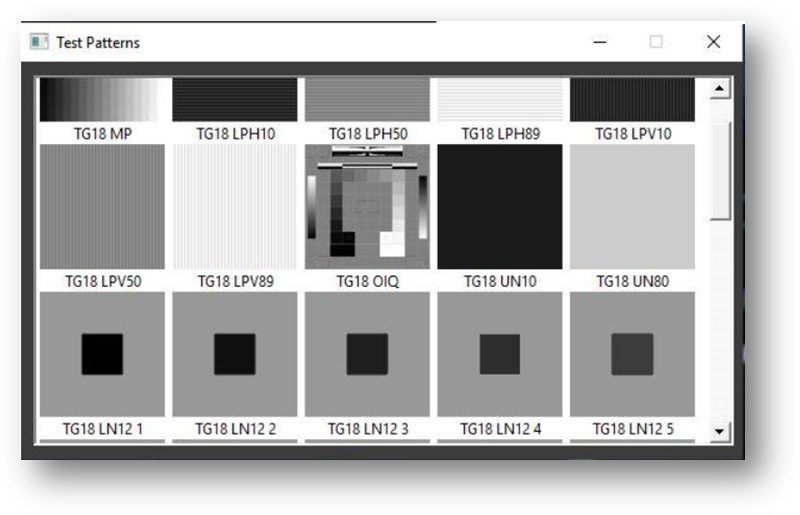
- KB article [2167] will provide more information:
- The Visual test will guide the workstation user through a set of test patterns and can be used to evaluate the display through visual inspection
- it is advisable to select the patterns mentioned below
- QAWeb Enterprise test pattern UN10
- QAWev Enterprise test pattern UN80
- QAWeb Enterprise test pattern TG18 OIQ
- QAWeb Enterprise test pattern TG18 MP

