
Issue
When you are in the process of commissioning a CX Base Unit you may encounter this, apparently the CX is stuck in Retrieving (eventually it will clear and go into local mode) - however, it does not retrieve a token.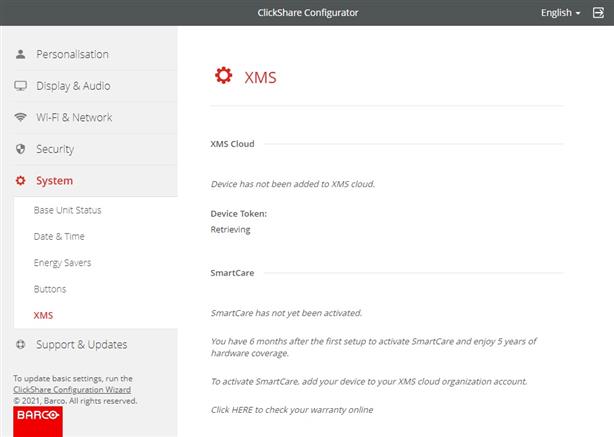
The issue is that the token is generated in the Azure cloud XMS servers. These servers cannot be reached, resulting in the above screen.
Resolution
Solution 1 (Recommended)
To ensure optimal performance and access to cloud-enabled features, we recommend registering your ClickShare CX Base Unit using one of the following methods:
- QR code scanning: how-to, see KB15557
- Clicking Registration link in ClickShare Configurator: how-to, see KB10810
Note: Before proceeding with either method, ensure your ClickShare Base Unit is updated to the latest firmware version (how-to, see KB5923).
Solution 2 (Alternative)
To resolve the issue,
- Ensure the Base Unit is connected to the internet.
- Reboot the Base Unit to restart the token retrieval process.
- If the issue persists, please contact your IT department to ensure that all required URLs and ports for CX and C-series devices are allowed through the firewall as outbound connections. For information on necessary URLs and ports requirements, see KB3220.
Related Articles
- What happened to the device token ID required for my ClickShare Base Unit registration?
- Tips to troubleshoot "Unable to register ClickShare device, please retry.." error when using a device token
- How to Register ClickShare Devices (C/CB/CX) in XMS Cloud?
- Registering ClickShare (C/CX/CB Series) devices to XMS Cloud via QR code scan
- How to Register a ClickShare Device (C/CB/CX) in XMS Cloud Using the Registration Link on the Configuration Wizard?
- Which ports does the ClickShare devices use?

