
Functions
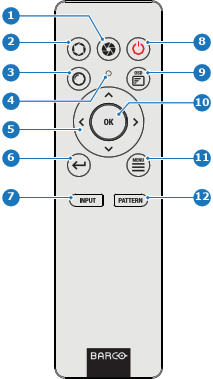
- 1
- Close shutter
- 2
- Open shutter
- 3
- Open menu
- 4
- Button pressed indicator
- 5
- Menu navigation keys
- 6
- Move back one level in menu system
- 7
- Open menu
- 8
- Power on / off
- 9
- OSD menu on / off
- 10
- Menu confirmation
- 11
- GUI activate / deactivate
- 12
- Open menu
